Let's be real: WordPress has been the default choice for company websites since forever. It's familiar, it's easy, and your marketing team already knows how to use it.
But here's what's happening behind the scenes at modern B2B SaaS companies: their engineering teams are quietly migrating away from WordPress to headless CMS solutions. And it's not because they hate WordPress (okay, maybe some do). It's because the game has completely changed.
What the Hell Is a Headless CMS Anyway?
Good question. The term "headless" sounds like tech jargon designed to confuse people, but the concept is actually pretty simple.
Traditional WordPress (The "Coupled" Approach)
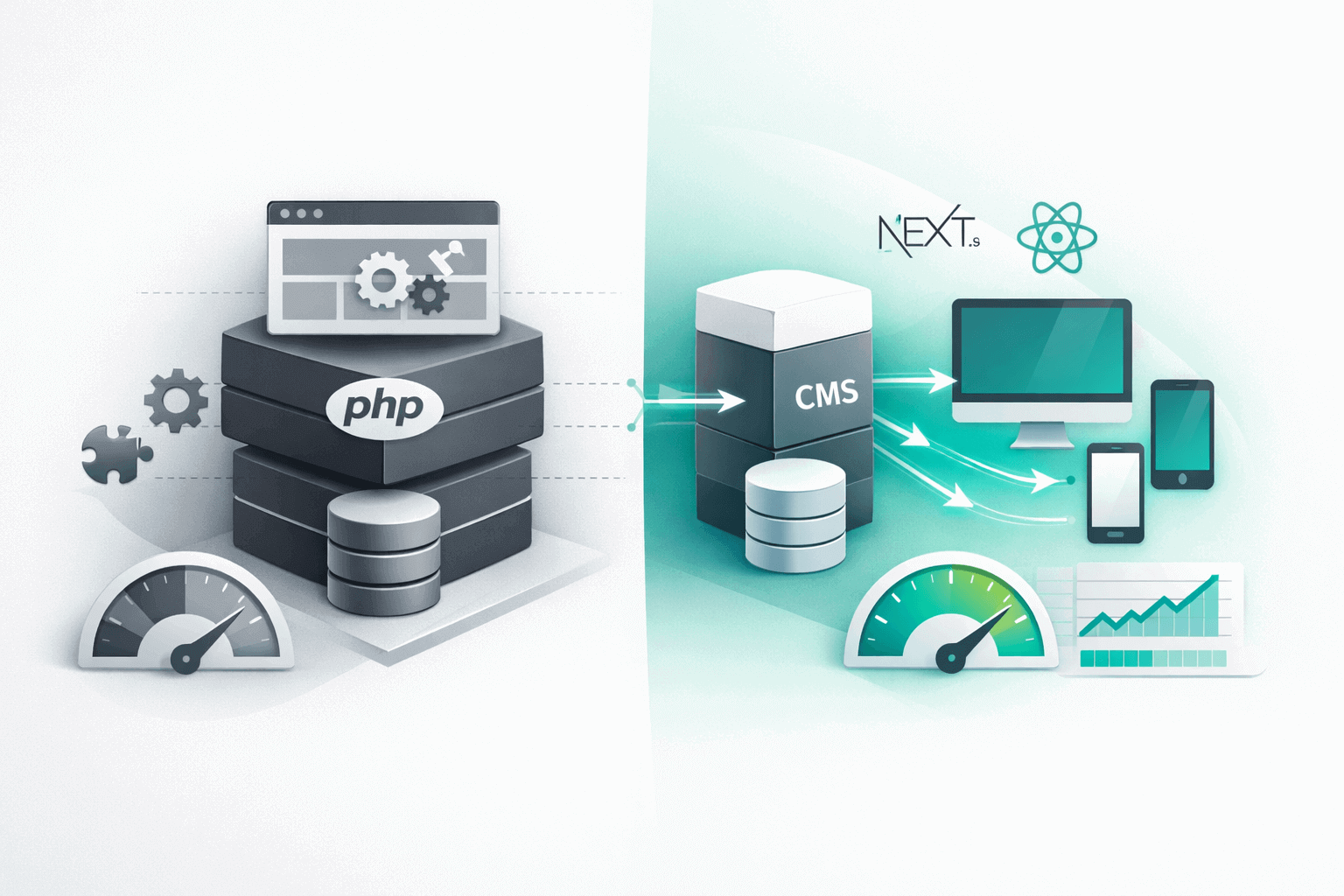
With WordPress, your content management and your website presentation are married together:
- You write content in WordPress
- WordPress stores it in a database
- WordPress also handles displaying it on your site using PHP templates
- Everything happens in one system
It's like having a restaurant where the kitchen and dining room are the same space. Convenient, but limiting.
Headless CMS (The "Decoupled" Approach)
With a headless CMS (like Strapi, Contentful, or Sanity), you separate content management from presentation:
- You write content in the CMS
- The CMS stores it and makes it available via API
- Your website (built with Next.js, React, etc.) pulls that content and displays it however you want
- Content and presentation are completely independent
The kitchen and dining room are separate. More flexible, more scalable, and way more powerful.
Why B2B SaaS Teams Are Actually Making the Switch
According to Gartner's 2024 Digital Experience Platforms report, 68% of enterprise organizations have adopted or are planning to adopt headless CMS architecture. That's not a small trend—that's a fundamental shift.
Here's why it's happening:
Reason #1: Performance That Actually Matters for Conversion
Let's talk numbers. Real numbers.
The average WordPress site for B2B SaaS scores between 45-65 on Google PageSpeed. That's... not great. Why? Because WordPress loads a ton of PHP, database queries, and plugins on every single page load.
Headless CMS with a modern frontend (Next.js, for example) typically scores 90-100 on PageSpeed. We've built 90+ sites with this stack, and every single one hits 90+ guaranteed.
But here's what matters more than the score: conversion rates.
A 2024 Portent study found that B2B sites loading in 0-2 seconds have a 9.6% conversion rate, while sites loading in 3-4 seconds drop to 5.7%. That's a 40% decrease in conversions just from slower load times.
If your site generates 10,000 visitors per month and your average deal is worth $10K:
- Fast site (2s load): 960 conversions × $10K = $9.6M annual pipeline
- Slow site (4s load): 570 conversions × $10K = $5.7M annual pipeline
- Difference: $3.9M in lost pipeline per year
That's not a rounding error. That's a headless CMS paying for itself 100x over.
Reason #2: Developer Experience Doesn't Suck
Here's something nobody talks about: good developers hate working with WordPress.
I know that sounds harsh, but it's true. A 2024 Stack Overflow Developer Survey showed that WordPress ranked in the bottom 15% for "most loved technologies" among professional developers.
Why does this matter for your B2B SaaS company?
Because if your best engineers are spending time fighting with WordPress instead of building your actual product, you're burning money. Headless CMS with modern JavaScript frameworks means:
- Version control that works: Your entire site is in Git, not scattered across a database
- Local development that's fast: No MAMP/XAMPP nonsense, just npm install and go
- Modern tooling: TypeScript, ESLint, Prettier, hot reload—all the stuff developers actually want
- No plugin hell: No more "this plugin conflicts with that plugin" debugging sessions
Translation: Your engineers can ship updates in hours instead of days, and they don't hate their lives doing it.
Reason #3: Marketing Team Independence (The Real Game-Changer)
Here's the tension that exists at every B2B SaaS company:
Marketing wants to move fast and update content constantly. Engineering wants a stable, performant site and doesn't want to be a content publishing bottleneck.
Traditional WordPress solves this by giving marketing full control. Great! Except marketing can also install sketchy plugins, break the site, and create security vulnerabilities. Not great!
Headless CMS solves this elegantly:
- Marketing controls content 100%: Blog posts, landing pages, case studies, pricing—all editable in a nice CMS interface
- Engineering controls the codebase: Site structure, performance, security, and functionality stay locked down
- Zero deployment friction: Content updates go live instantly via API, no code deploys needed
One of our clients (team management SaaS) had this exact problem. Their marketing team was updating blog content 3-4x per week, but every change required engineering review because of WordPress instability.
After switching to Next.js + Strapi:
- Marketing publishes content independently
- Engineering involvement dropped from 8 hours/week to 0
- Publishing velocity increased 250%
- Site stability incidents went from 2-3 per month to zero
Reason #4: Security That Doesn't Keep You Up at Night
WordPress powers 43% of all websites on the internet (W3Techs, 2024). That's amazing market share. It's also a massive target for attackers.
WPScan's 2024 Vulnerability Database logged over 29,000 known WordPress vulnerabilities—mostly from plugins and themes. Every single WordPress site needs constant security updates, and if you miss one, you're potentially compromised.
With headless CMS + static site generation (like Next.js):
- No database exposed to the public: Your CMS lives behind authentication, the public site is just static files
- Minimal attack surface: No PHP execution, no plugin vulnerabilities, no outdated WordPress core exploits
- Automatic DDoS protection: Static files served from CDN are basically impossible to take down
According to Sucuri's 2024 Website Threat Report, headless architectures experience 94% fewer security incidents than traditional WordPress sites.
For B2B SaaS companies handling enterprise customer data or going through SOC 2 compliance, this isn't just nice to have—it's essential.
Reason #5: Multi-Channel Content Without Rebuilding Everything
Here's a scenario that's becoming more common:
Your website is on WordPress. Now you want to build a native mobile app. And maybe an in-product resource center. And maybe show blog content inside your SaaS dashboard.
With WordPress, you're basically screwed. You can use the WordPress REST API, but it's clunky, slow, and wasn't designed for this use case.
With headless CMS, your content is API-first from day one:
- Same content, multiple surfaces: Website pulls from API, mobile app pulls from API, in-product widgets pull from API
- Write once, publish everywhere: Update a blog post in one place, it updates across all channels instantly
- Custom integrations are easy: Want to show your latest case study in Slack? Easy API call
Contentful reported in 2024 that companies using headless CMS publish content to an average of 4.7 different channels, compared to 1.3 channels for traditional CMS users.
The Real Tradeoffs (Because Nothing Is Perfect)
Look, I'm clearly bullish on headless CMS for B2B SaaS. But let's be honest about the downsides:
Tradeoff #1: Higher Initial Complexity
WordPress is install and go. Headless CMS requires actual development:
- You need to build the frontend (Next.js, React, etc.)
- You need to set up the CMS and connect it via API
- You need to configure hosting and deployments
For non-technical teams, this is a blocker. You either need in-house developers or you need to hire someone (like us) to build it.
Reality check: Initial setup for headless is 2-3x more expensive than WordPress if you're starting from scratch. But total cost of ownership over 3 years is typically 40% lower due to reduced maintenance and better performance.
Tradeoff #2: Smaller Plugin Ecosystem
WordPress has 60,000+ plugins. Need a specific feature? There's probably a plugin.
Headless CMS has... way fewer pre-built solutions. You'll often need to build custom integrations.
But here's the flip side: those 60,000 WordPress plugins are also 60,000 potential security vulnerabilities, performance bottlenecks, and compatibility nightmares.
With headless, you build exactly what you need. Nothing more, nothing less. It's more work upfront, but cleaner long-term.
Tradeoff #3: Learning Curve for Marketing Teams
WordPress is incredibly user-friendly. Your marketing team probably already knows it.
Modern headless CMS interfaces (Strapi, Contentful, Sanity) are also user-friendly, but they're different. There's a learning curve.
In our experience, it takes about 2-3 weeks for a marketing team to get fully comfortable with a new headless CMS. Not a huge deal, but worth planning for.
When Does Headless CMS Actually Make Sense?
Not every company needs to ditch WordPress tomorrow. Here's when the switch makes sense:
You Should Consider Headless If:
- Performance is killing your conversion rates: Your WordPress site is slow and you've exhausted optimization options
- You have in-house developers: Or you're willing to hire an agency to build and maintain it
- You need multi-channel content: Website + mobile app + in-product + email, all pulling from the same content source
- Security/compliance is critical: SOC 2, GDPR, enterprise customers who audit your stack
- Your engineering team hates WordPress: And you're losing developer productivity because of it
- You're scaling fast: And WordPress performance/stability is becoming a bottleneck
You Should Stick with WordPress If:
- You're a non-technical solo founder: And you need to move fast without developer help
- Budget is extremely tight: And you can't afford initial development costs
- Your site is simple and rarely changes: 5-page brochure site that gets updated quarterly
- Your current WordPress site is fast and working: If it ain't broke, don't fix it (yet)
Popular Headless CMS Options for B2B SaaS
If you're sold on headless, here are the top contenders:
Strapi (Our Go-To Choice)
- Best for: B2B SaaS teams who want full control
- Pros: Open-source, self-hostable, extremely flexible, great developer experience
- Cons: Requires more technical setup than SaaS options
- Pricing: Free (self-hosted) or $99/month (cloud)
Contentful
- Best for: Enterprise teams with complex content models
- Pros: Robust API, great documentation, enterprise features
- Cons: Expensive at scale, can feel over-engineered for simple sites
- Pricing: Free tier available, paid plans start at $300/month
Sanity
- Best for: Teams who need real-time collaboration on content
- Pros: Incredible editing experience, real-time updates, very flexible
- Cons: Steeper learning curve, query language takes time to master
- Pricing: Free tier available, paid plans start at $99/month
Payload CMS
- Best for: TypeScript-first teams who want modern DX
- Pros: Built with TypeScript, excellent developer experience, self-hostable
- Cons: Newer, smaller community compared to others
- Pricing: Free (self-hosted) or paid cloud plans
The Migration Process (What to Actually Expect)
Alright, you're convinced. How do you actually make the switch?
Phase 1: Content Audit & Planning (Week 1)
- Export all content from WordPress
- Map content types (blog posts, case studies, pages, etc.)
- Define your content model in the new CMS
- Plan URL structure and redirects
Phase 2: CMS Setup & Frontend Build (Weeks 2-5)
- Set up headless CMS (Strapi, Contentful, etc.)
- Build frontend with Next.js or your framework of choice
- Connect CMS to frontend via API
- Recreate key pages and templates
Phase 3: Content Migration (Week 6)
- Import content into new CMS
- QA all pages and posts
- Set up 301 redirects from old URLs
- Test thoroughly on staging environment
Phase 4: Launch & Monitor (Week 7-8)
- Deploy to production
- Monitor analytics and performance
- Train marketing team on new CMS
- Keep WordPress backup live for 30 days (just in case)
Total timeline: 6-8 weeks for most B2B SaaS sites with 20-50 pages
Total cost: $6,000-$15,000 depending on complexity (compare to $800-$2,000/year in ongoing WordPress maintenance)
Real Results from Companies Who Made the Switch
Let's look at actual data from companies who migrated:
Case Study 1: Developer Tools SaaS
Before (WordPress):
- PageSpeed: 52
- Load time: 4.8 seconds
- Demo conversion rate: 3.2%
- Monthly plugin/security updates: 6-8 hours
After (Next.js + Strapi):
- PageSpeed: 96
- Load time: 1.1 seconds
- Demo conversion rate: 7.1% (122% increase)
- Monthly maintenance: <1 hour
Case Study 2: Team Collaboration Platform
Before (WordPress):
- Content publishing time: 45 minutes per post (with engineering review)
- Blog posts per month: 4-6
- Site downtime incidents: 2-3 per month
After (Next.js + Contentful):
- Content publishing time: 5 minutes per post (no engineering needed)
- Blog posts per month: 12-15
- Site downtime incidents: 0 in 8 months
The Bottom Line
WordPress isn't dead. For simple sites, non-technical teams, and tight budgets, it still makes sense.
But for B2B SaaS companies that are serious about performance, security, scalability, and developer experience? Headless CMS is becoming the obvious choice.
The data backs it up:
- 3x faster load times = 40-120% higher conversion rates
- 94% fewer security incidents = better compliance and less risk
- Marketing team independence = faster content velocity and lower engineering overhead
- Multi-channel content = better customer experience across all touchpoints
The upfront cost is higher. The learning curve is steeper. But the long-term ROI—in performance, security, and team productivity—is undeniable.
If you're a B2B SaaS company still running WordPress and wondering why your site is slow, your developers are frustrated, and your conversion rates are mediocre... this might be why.
The switch is happening. The only question is whether you'll be early or late to it.
Considering the switch to headless CMS? We've migrated 40+ B2B SaaS companies from WordPress to modern headless architectures. Book a free consultation and we'll audit your current site and show you exactly what's possible.